How to check eBay sold prices for antiques
An antique is worth roughly what someone recently paid for one like it, not what a seller is hoping for. eBay shows you those sales for free if you flip one filter. Here is how, and how to read what you find.
To check eBay sold prices for antiques, search for the item, then turn on the Sold items filter (on the website it is under "Show only" in the left column; in the app it is under Filter). Sold prices show in green. Compare several close matches in the same condition, ignore the odd high or low sale, and read the middle. Normal search shows about the last 90 days of sales.
Asking prices vs sold prices
Search eBay for almost any antique and the first page is full of big numbers. Those are asking prices. Anyone can list a teapot at any price, and the overpriced ones stay on the site for months, so they are the ones you keep seeing.
A sold price is different. It is the amount a real buyer agreed to pay, on a real day. Kovels gives the same advice: research completed sales, not asking prices, and prefer recent ones, because "collecting markets change."
This matters in both directions. If you are selling, asking prices make you expect too much, and your listing sits. If you are clearing a house, they can make you hold on to things that would sell quickly for less. If you buy to resell, sold prices are the only honest ceiling on what you can pay.
Step by step, on the web and the app
The filter is the same idea on both. The website gives you a little more control, so use a computer for anything you are serious about pricing.
- Search the way a cataloger would
Type what is actually on the piece and what it is: the maker, the pattern or model name, the material and the form. "Wedgwood jasperware covered urn" finds far better matches than "old blue vase". If there is a mark, use the words in it. If you do not know the name yet, start broad and tighten the words as the results teach you.
- Turn on Sold items
On a computer: in the filter column on the left, under Show only, tick Sold items. You can also open Advanced next to the search bar and choose sold listings. In the eBay app: run your search, open Filter and turn on Sold items; it is sometimes grouped under Show only or item details. eBay moves these controls from time to time, so if the wording differs, look for anything that says sold.
- Check the prices are green
On the website, sold prices show in green. If you see prices in other colors, you are also looking at listings that ended without a sale. That happens when Completed items is switched on as well.
- Open each close match
Do not trust the thumbnail. Open the listing and read the title, the photos and the condition notes. Check the maker or pattern, the size, the condition and whether anything is missing, such as a lid, a stopper or one chair of a set.
- Watch for accepted offers
If a price is struck through, the item likely sold through Best Offer. eBay often does not show the price that was actually accepted, so the number you see may be higher than what the buyer paid. Count those sales as a ceiling, not a price.
- Write down several sales and read the middle
Note the sold price of every true match you find. Drop anything wildly above or below the rest, then look at where most of them cluster. That middle band is your realistic range.
A tip for the website: if you check prices often, run one sold search and bookmark the results page. The filters are saved in the page address, and trade guides note that adding &LH_Sold=1&LH_Complete=1 to a search address does the same thing.
Completed items vs Sold items
These two filters sound alike and do different jobs.
- Sold items shows listings that ended with a sale. This is the one you want for a price.
- Completed items shows everything that ended: the sales and the listings that got no buyer.
Completed items is still useful. If you see the same kind of chair listed ten times and sold twice, the price those eight sellers asked was too high, or the demand is thin. That is worth knowing before you list your own.
When a seller accepts a Best Offer, eBay often shows the original asking price struck through instead of the price that was actually paid. The real sale was usually lower. If most of your comparables sold this way, your range is probably too high.
How far back you can see
In normal search, sold listings go back about 90 days. eBay's own help page on this did not load when we checked, so that figure comes from eBay community mentors and trade guides. They agree with each other, but treat it as "about."
Ninety days is plenty for common things, such as a popular china pattern or a standard piece of silver plate. It is not enough for rare pieces that sell a few times a year. For those, see going further back below.
Picking real comparables
This is where most people go wrong with antiques. A listing that looks similar is not the same item. Before you count a sale, check that it matches yours on:
- Maker and pattern. The same factory, the same pattern or model, and ideally a similar mark. An unmarked look-alike is a different item.
- Condition. Chips, cracks, repairs, worn gilding and replaced parts all pull the price down. Compare like with like.
- Size. A large platter and a small one in the same pattern can sell very differently. Check the measurements in the listing.
- Completeness. A lid, a stopper, a full set or the original box can change the price a lot.
- Several sales, not one. Outliers happen: a bidding war, a mistake, or worse. Look at where most sales land.
Then read the result as a range. The low end is what a quick sale gets; the middle is a fair price with a good listing; the top is what a perfect example got on a good day. Also remember that the sold price is not what the seller kept: selling fees come out of it.
If you cannot find a single true match, that tells you something too. The piece may be scarce, or you may not have the right name for it yet. Our guide to finding what an antique is worth covers the other routes.
Going further back
When 90 days of eBay is not enough, these are the main places to look. Auction results come with their own catch: a hammer price may or may not include the buyer's premium, and a sale at a big-city specialist auction does not translate directly to a local one.
| Source | Cost | How far back | Watch out for |
|---|---|---|---|
| eBay Sold items | Free | About 90 days | Best Offer prices may show higher than the real sale |
| eBay Product Research (formerly Terapeak) | Free for sellers | About 3 years | Needs a seller account; it is in Seller Hub under Research |
| LiveAuctioneers price results | Free account | Back to 1999 | Auction results; check whether the buyer's premium is included |
| Invaluable price archive | Free for about 12 months; older results paid | 12 months free; 5 or 15+ years on paid plans | Mostly traditional antiques and art auctions |
| WorthPoint | Paid subscription | Archive of past eBay and auction sales | Around $30 a month at the time of writing (September 2026), per third-party reports |
Checked September 25, 2026. Plans and limits change; confirm on each site before you pay for anything.
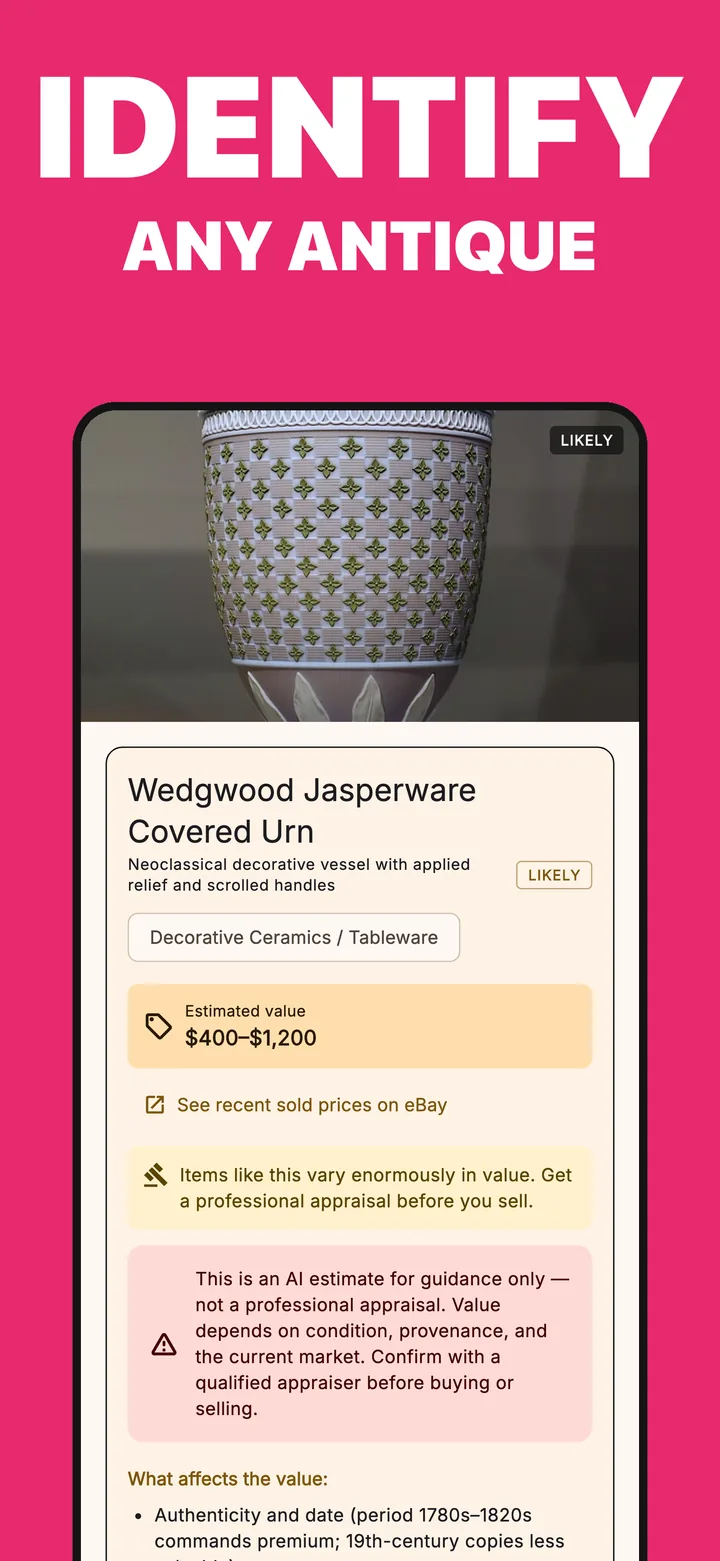
The hardest step with antiques is often the first one: knowing what to type. Vintio, an antique identifier app for iPhone, suggests what the piece likely is from your photos, with a confidence level and an estimated value range with its reasons.
The result screen has a See recent sold prices on eBay button. It opens a sold-listings search on eBay, already filled in for the item Vintio identified. It is a shortcut into exactly the steps above, not price data inside the app, so you still open the listings and pick your comparables. Use it to check the app's estimate against real sales. Get Vintio on the App Store.
Questions people ask
How do I see sold items on the eBay app?
Search for the item, tap Filter, and turn on Sold items. Depending on the version of the app it may sit under Show only or item details. eBay community mentors say you can also set the filter to stay on for later searches.
How far back do eBay sold listings go?
About the last 90 days in normal search. That figure comes from eBay community mentors and trade guides rather than an eBay help page, but they agree. For older sales, eBay's Product Research tool (formerly Terapeak) in Seller Hub shows about three years of sales data and is free for sellers.
Why are sold prices lower than asking prices?
Asking prices are what sellers hope to get, and nothing stops a seller from asking too much. Many overpriced listings simply sit there unsold. Sold prices are what a buyer actually agreed to pay, which is why they are the better guide.
How many comparables do I need?
There is no official number. Our rule of thumb is to find several true matches, ideally three to five or more, and read the middle of them. One sale is a hint, not a price, and a single very high sale is the one most likely to mislead you.
Updated September 25, 2026. eBay changes its filters and menus from time to time; if a step no longer matches what you see, look for the Sold option in the search filters. Vintio is not affiliated with eBay Inc.

Not sure what to search for? Start with a photo.
Vintio suggests what the piece likely is, then its eBay button opens a sold-listings search for it. You still read the sales yourself; it saves you the guesswork.

On a computer?Scan to get it on your iPhone.
Free to download · 3 free identifications · Pro is $4.99/week with a 3-day free trial, or $39.99/year · iPhone, iOS 15+